How To Connect Samsung Mobile To PC For Internet Connection


Download and Configure The Samsung New PC Studio

According to the official Samsung site, NPS = Samsung New PC Studio which is the application to organize the contents between Samsung mobile and PC. NPS provides you with convenient access to your device, data management via easy backup and sync, and powerful multimedia features.

Today I’m going to be showing you how to connect to the internet using Samsung PC Studio and your Samsung mobile phone as a modem.

Please make sure that you have a strong internet connection as the NPS download is quite heavy coming in at about 165MB.

Here we go.


Download and Install Samsung New PC Studio. Here’s a Direct Download Link

Once the installation is complete, open the software and connect your phone via the USB cable to your computer.  When your phone prompts you, select PC Studio. As soon as the computer recognizes your phone, it will immediately pop up to the right of the screen as shown below.
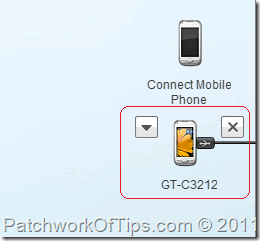
How to connect your phone to samsung pc studio

By the default, the Samsung NPS Internet Connector is deactivated and as such will have to be activated before we can connect to the internet.

As shown below, click on Widget Settings, add the Internet Connector widget and hit the OK button.
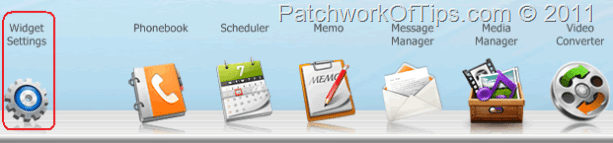
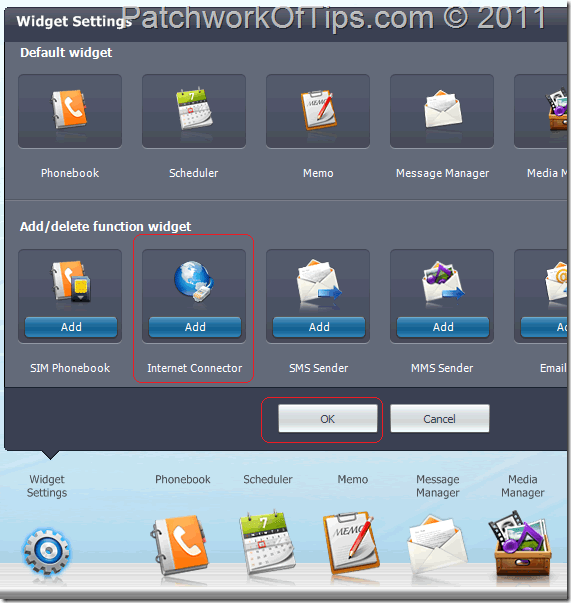
How to activate the Internet Connection widget in Samsung PC Studio

How to activate the Internet Connection widget in Samsung PC Studio

The Internet Connector widget should now be shown along side other widgets as shown below. If it doesn’t appear, you’d have to scroll a little to the right to see it as you might be having too many widgets which are blocking it from being seen at once.

How to activate the Internet Connection widget in Samsung PC Studio

HOW TO CONFIGURE THE SAMSUNG NEW PC STUDIO INTERNET SETTINGS

Click on the Internet Connector Widget ====> Menu =====> Connection Settings
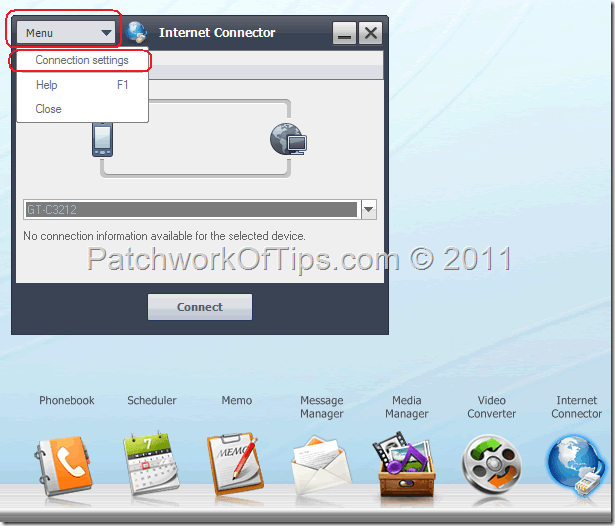
How to setup internet configuration in samsung pc studio

Samsung NPS by default comes with the internet settings of some countries and networks already configured. If your country is not listed, you’d have to manually configure it as shown below.

I’m going to assume that your country is not listed in the software.

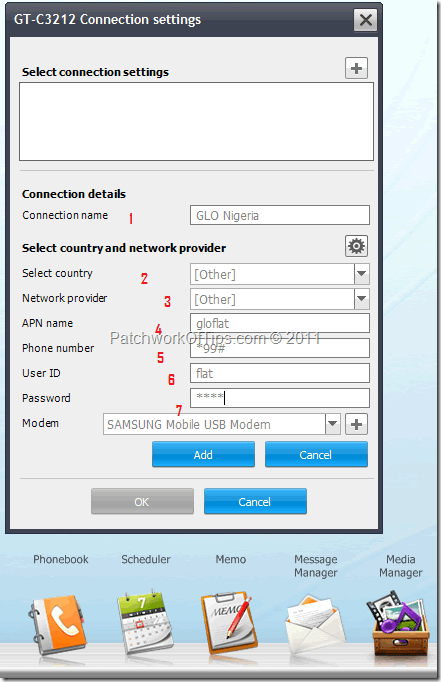
Hit the + button beside Select connection settings then start filling in the slots.

  1. Connection Name: The name of your network
  2. Select Country: since our country is not listed, select Other
  3. Network Provider: Other
  4. APN name: your network’s apn
  5. Phone number: *99#
  6. User ID: username or id with which your network allows you access to the internet.
  7. Password: password with which your network allows you access to the internet.
  8. Click on Add

How to setup internet configuration in samsung pc studio

Your newly setup Samsung internet connection settings should now appear as shown below. Click the OK button to return to the Internet Connector widget.
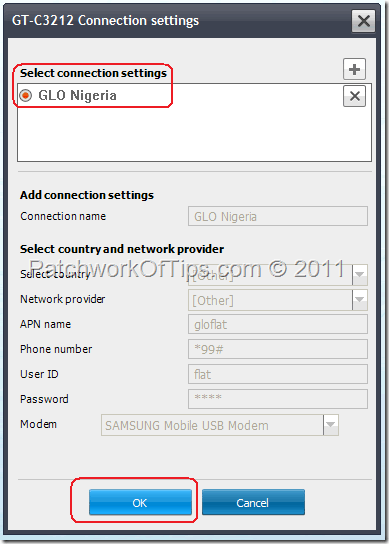
How to setup internet configuration in samsung pc studio

To connect to the internet, click on Connect then answer yes to the pop-up that follows afterwards as shown below.
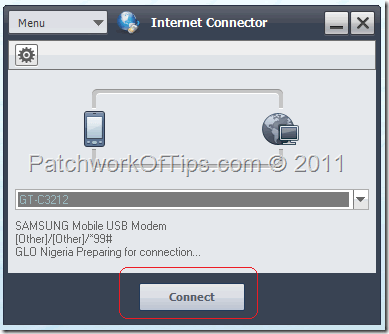
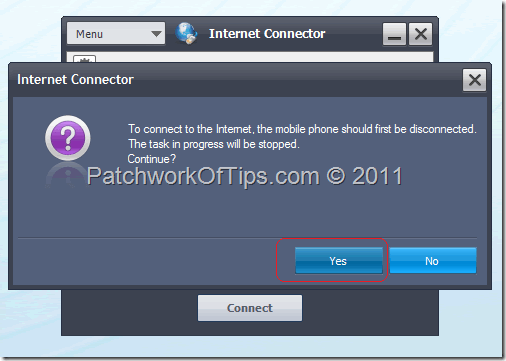
How to connect to the internet with samsung pc studio and mobile phone

How to connect to the internet with samsung pc studio and mobile phone

Wait a few seconds for Samsung’s New PC Studio to find your network and then connect you.
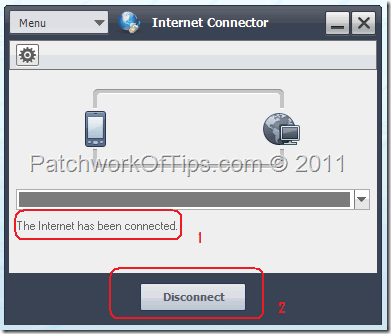
How to Disconnect From The internet using Samsung PC Studio

To disconnect from the internet, hit the disconnect button.

And so folks, there you have it. A quick and easy way to use your Samsung Mobile as a modem to connect to the internet via the Samsung New PC Studio.

HOW TO FIX SAMSUNG PC SUITE FAIL MODIFY ERROR

A friend of mine was getting this error on her computer and after so many trials, I couldn’t find a permanent solution to it. The only solution that worked was uninstalling Samsung New PC Studio totally and reinstalling it again. Hope this helps ;)

If you’ve got an questions, do please feel free to use the comment form below. Cheers Winking smile.


Author Photo

Article written by On

I’m a Medical Doctor wannabe geek/celeb with an addiction to all things Lights, Camera, Action! I own a BlackBerry Z10, a THL W6, a BlackBerry PlayBook 64GB Wi-Fi , a Dell Inspiron N411Z and the Pliris Blaze +. You can connect with me via Twitter, Facebook, Google+ and BlackBerry Messenger 24CEF3E2 for updates and support


254 Comments so far. Leave Yours Below

If you want to ask a question regarding anything, do please make use of the floating search bar at the top of this site. If you don't find what you're looking for, then feel free to ask your question

Most comments will get a reply within 1hr to 24hrs


Comment moderation is enabled and may delay your comment. There is no need to resubmit your comment.


  1. nishant says:

    Im gettin an error msg when i click on connect…..”oss error:remote computer could not connect…..pls help me

    • Udegbunam Chukwudi says:

      From my experience remote computer could not connect means problems with your internet provider. Try contacting them.

  2. AnandKumar says:

    In the above process Phone number to dial for internet connection is disabled.
    Ex: I wants to enter tata-docomo connection. For that numbe is *99# but the PC suite showing #777 and in disable mode. How can I change it?

    • Udegbunam Chukwudi says:

      If tata-docomo appears in the list of network providers, you will not be able to edit it. Try connecting like that and if it doesn’t work, create a new tata-docomo settings and use *99#.

      Let me know how it goes :-)

      • AnandKumar says:

        Hi its giving #777 so there is no option fr that. Even I create new settings I guess it is hard coded in the Mobile memory.

      • AnandKumar says:

        What do you mean by “create a new tata-docomo settings and use *99#.” How can I do it in mobile As I know we will get the settings and we need to save it.
        In that case the service provider of inter list should show only those who are installed in the mobile.
        But in the pc studio it showing almost 11.

        • Udegbunam Chukwudi says:

          To create a new profile, you need to know the internet settings of your network provider just like I explained in the post above. You need to know their APN, Username and Password.

      • AnandKumar says:

        Even After I editing the APN name also the phone number field not become editable. If ir editable I can change it to *99#. Problem is due to its not editable if I click on connect in the mobile #777 getting called and it gets failed. font know is there any way to edit it.

      • ANONYMOUS says:

        i am having the same problem,,……….. how can i add tata docomo in tht?

    • Nikhil says:

      Hey anand i dont know whether u hav connected internet or not. its long of ur question. i m giving u te solution in the country option click on “others” then u can change ur APN and no.

  3. Deep says:

    I have a samsung corby pro(GT-B5310), when i plug it in NPS, a pop up opens telling me to select PC studio option in my phone but in
    Phone settings->Pc settings there are only 3 options:-
    Samsung kies,Media Player, Mass storage,
    What should i do? i tried all of them but in vain.!
    Please help,.!

    • Udegbunam Chukwudi says:

      I really wouldn’t know which option to choose in this case as I’ve never seen the Corby before but looks like Kies is the correct option man. You might need to shut down your computer, reboot and then try reconnecting again. Maybe there was a port interference.

    • dsf says:

      hey how did u solve ur problem ?????
      if its solved mail me the procedure
      mad143man@gmail.com

    • suam says:

      you should use the “samsung kies” latest software for your mobile device these download from google just type the samsung kies download in search bar to download

  4. satendra says:

    Even After I editing the APN name also the phone number field not become editable. If ir editable I can change it to *99#. Problem is due to its not editable if I click on connect in the mobile #777 getting called and it gets failed. font know is there any way to edit it.

  5. satendra says:

    Im gettin an error msg when i click on connect…..”oss error:remote computer could not connect…..pls help me

    • Udegbunam Chukwudi says:

      This is generally a problem with you internet service provider. I suggest you contact them or try connecting again after a few minutes or hours. Network might be down in your area.

  6. pramod says:

    THANKS…

  7. Paul katongole II says:

    can i use sum pc studio on my pc whch is not conected to internate?

  8. Noying Ezung says:

    thnks s lot sir, i got a lot of probs b4 knowing all this things so i gots say thank you for posting this important note and instructions……may it be beneficial for others too……….. keep it up…….God blez ya!!!!!!! with lots of love………Noying ezung

  9. nitin says:

    How can i get information apn,username and password

    • Udegbunam Chukwudi says:

      You have to contact your internet provider for that information. You could search Google or their official site for it.

  10. osdaf says:

    what about how to connect it using etisalat ng?
    have been trying it but not working.

    • Udegbunam Chukwudi says:

      For Etisalat Nigeria your APN should be etisalat while the username and password fields should be left blank. Phone number remains *99#

  11. Dinesh says:

    Is it necessory to download the samsung pc suit, to connect internet on laptop by using samsung mobile.
    Where i can get the samsung pc suit, i have the E 251 model of samsung
    thanks

    • Udegbunam Chukwudi says:

      The download link for Samsung New PC Studio is right there in the beginning paragraphs of theis article

  12. yash says:

    hey frds where should we find apn setting pls pls pls help me

    • Udegbunam Chukwudi says:

      Call the customer care line of your telecom company and ask them. They might also have it listed on their official site too ;-)

  13. Johnson says:

    Can i use nokia 3100c as a modem to browse with laptop with etisalat? If yes please tell me how to set it up.

    • Udegbunam Chukwudi says:

      As long it has a USB port or Bluetooth, the Nokia 3100c can be used as a modem. Check out: http://www.patchworkoftips.com/internet-connection-nokia-mobile-ovi-suite/205/

  14. dilu says:

    sir,after connecting to my phone to pc my widget not showing any application in pc studio.so my internet conector is not available.how can restore the applications,,,

  15. Richard says:

    I wrongly Hard Reset my Samsung Version
    PDA : pi907UCJD1
    PHONE : i907UCID1 (Now must files had been deleted, can I download the Factory software or Drivers and how? Richard

  16. bani says:

    hi. i am having a problem. the APN name slot and the phone number slot is frozen. so i am not able to give new details to it. what should i do? pls help.

  17. bani says:

    there is no existing profile. so i created a new one. the frozen slots are already having some details which i think are wrong.

    • Udegbunam Chukwudi says:

      Make sure to set the Select country section to Other. Do this and other sections will be unblocked.

      • dinesh verma says:

        sir i have samsung 3G GT-BT 7722 (with modem.)with docomo connection i installed new samsung suit in my pc.mobile does not connect with pc all settings are installed in pc.error 734 was published sfter connection.plz ans me txssssssssssss.plz plz plz plz.costly phone but mind upset

  18. bani says:

    is it necessary to write the phone number as *99#. bcoz now it is giving me this error msg : OS Error message : The PPP link control protocol was terminated.

    • Udegbunam Chukwudi says:

      That error sometimes has to do with network problems or modem port issues. Restart your computer, connect your samsung phone to the computer then try to connect to the internet again.

      The *99# number is required by most internet providers but you could try with or without and see what happens.

      Do let me know if it connects finally. Cheers

  19. bani says:

    i hv restarted my computer but it’s still not connecting.

    • Udegbunam Chukwudi says:

      Like I told you previously, this could be a network issue. Pls read in.answers.yahoo.com/question/index?qid=20101001004414AA1Hugd

  20. Jignesh gohil says:

    i use samsung gts 5263 when i connect it with the cable i cant find the pc studio option in mobile. it gets connected directly. and pc sudio cant set it as modem. so what should i do.? plz inform me

    • Udegbunam Chukwudi says:

      If you can’t find the PC Studio option on your mobile phone please check your phone’s manual. All Samsung phones I’ve come across do show the PC Studio option.

  21. bani says:

    thanks a lot.. now my mobile is able to connect to the internet. actually there was a problem in the settings. i searched a lot to find a solution to the PPP link error problem and then i changed something in the pc. Thanks a lot. :)

  22. bani says:

    now I am having another problem. For some reason the internet gets disconnected on its own after sometime. I have to restart my computer to reconnect my cellphone to the internet. When i restart i get this message :
    Data Execution Prevent
    To help protect your computer windows has closed this program
    NAME : Generic Host process for win32 services.

    what should i do?
    pls help…

    • Udegbunam Chukwudi says:

      I always experience the same issue on my computer as well and once this happens, I have to restart the phone and reconnect it again to the computer. Quite stressful no? I haven’t experienced the Data execution problem yet.

  23. Preethi says:

    Thank you very much…you gave a nice info……very useful…I did it…thanks again

  24. Adil says:

    Can you please help Me By saying Where can i see my apn name

  25. Ted says:

    When connecting using pc studio it keep saying ‘preparing to connect ‘and it never connect. i double checked the setting and when u click on connect the second time it say fail modify’

    • Udegbunam Chukwudi says:

      I never got that kind of error on my end. What model of Samsung are you using?

    • Sandip Nirmal says:

      Have you get any solution to this? Because I am facing the same issue. Please let me know the solution if you are able resolve it..

      Thanks

  26. NILESH VANJARi says:

    i am gettin an error msg when i click on connect…..os Erro Meg: The PPP link control protocol was terminated. Pls help me

  27. NILESH VANJARi says:

    What should i do? i tried all of them but in vain.! Please help…

  28. rohit says:

    my samsung nps is not having internet option in widjet settings. can anyone please help me?

  29. Siva says:

    I am getting an error
    that
    os error msg:the modem (or other connecting device) has reported an error

    and not able to connect to net
    plz help me

    • Udegbunam Chukwudi says:

      Try restarting your computer and connecting again without any other thing plugged to the usb ports.

  30. bosky says:

    is the same procedure will work with samsung 3530…plz tel me….

  31. somshubhra chakraborty says:

    when i connect my samsung mobile to samsung pc studio then it shows my phone when i click the search option but after that it says that an unregistered device has been found so connection cannot proceed. After that when i press the configuration setting option after choosing usb it demands for entering port. what should i do after this step, please guide me i will be very much thankfull to you.

    • Udegbunam Chukwudi says:

      Try uninstalling and reinstalling Samsung New PC Studio then follow the on screen instructions carefully to connect your phone to the PC ;-)

  32. C V L N Sastry says:

    You would think that a 65 year old fool would have learnt his lessons during his life time. Just do not buy crap, because it is cheap, like I did. I used a number of Nokia models and connected to the internet without any hassles. I am having all kinds of troubles with my Samsung GT 3213K. Thank you and God Bless for the helpful tips here.

    • Udegbunam Chukwudi says:

      With Nokia, connecting to the internet is a lot easier man. True. Glad my tutorial helped in some way ;-)

  33. Shashi kant says:

    I downloaded samsung pc studio 3.1 and tried to connect my samsung gt-B5310 AND the pop up came showing unknown hardware.how to connect?

    • Udegbunam Chukwudi says:

      Please download the new Samsung PC Studio. 3.1 is kinda old.

      • dinesh verma says:

        Your comment is awaiting moderation.

        June 18, 2011 at 4:13 pm
        sir i have samsung 3G GT-BT 7722 (with modem.)with docomo connection i installed new samsung suit in my pc.mobile does not connect with pc all settings are installed in pc.error 734 was published sfter connection.plz ans me txssssssssssss.plz plz plz plz.costly phone but mind upset

  34. bhushan says:

    I have bsnl postpaid agreeculture group sim card please send me setting. my phone is gt 3653

  35. prakhar says:

    I am confused. Does it enable our mobile to connect to PC internet? Or does it allow PC to connect to mobile internet?

  36. kamlesh goswami says:

    I am unable to connect my Samsung mobile no. gtc3530 to pc internet. can any body help me.

  37. akash says:

    hi i am akash i have choosen the samsung mobile for 3g hero gt3213K they did not give the pc suite which pc suite i have to take for this mobile please tell me. i want to connect the internet .

  38. allwin says:

    it says FAIL modify

  39. Carlison says:

    Hi! well, I have the Samsung New PC Studio and I connect the internet with my Corby but lately I have a problem. When I connect, it appears the message: fail Modify and to solve the problem I have to remove the software and to install it again and if I turn off the computer, when I turn it on, I have to do the same, to remove the software again and to install it, every time I have to do that. Could someone help me, please? I hadn’t problem with the connection, I don’t know what happens. Tks for help!

    • Udegbunam Chukwudi says:

      Connecting to the internet with a Samsung phone comes with a lot of issues and I’m yet to encounter yours. I suggest you try the Samsung Mobile forums/support for more info regarding your problem.

  40. rakesh says:

    when i connet my phone to pc ane open NPS then it does not show my mobile phon i.e. GT-C3303 so what can i do.

  41. shrikanth says:

    how to connect ineternet into cell to pc s3310

  42. adarsh says:

    man u rock……. this was really helpfull………….

  43. SUMEET SINGH says:

    Please tell me the steps to download samsung hero 3213 pc suite for mobile connectivity to home pc.

  44. mrs manjit chawla says:

    dear sir,you explain very nicely,please advice how to connect in tata cdma mobile or tata gsm mobile with tata net connection to my laptop

  45. Krishnendu says:

    same prob fail modify!!!! :’(

  46. krishna goud says:

    dear sir
    i buy sumsung hero 3g e3213 phone but cannot connect my phone the problem is anunregistered model has been connected commcation cannot proced

    • Udegbunam Chukwudi says:

      The software may not be compatible with your phone’s model

      • Santhoshkumar says:

        sir me too have the same problem “i buy sumsung hero 3g e3213 phone but cannot connect my phone the problem is anunregistered model has been connected commcation cannot proced” what to do for that plz send to my mail id

    • kishandonepudi says:

      try by disabling ur usb 2.0 driver

      My computer > manage > device manager > usb ports > usb 2.0 > disable.

  47. viswa says:

    does it work for samsung galaxy pop gt s5570

  48. mrs manjit chawla says:

    sir please let me know how i connect my SAMSUNG CT322 MOBILE NET TO MY LAPTOP BY BLUETOOTH

  49. Ananda sekar says:

    HAVING samsung DUOS – B5722 & Tata Docomo, Bangalore,INDIA, PL GUIDE ME HOW TO CONNECT IN LAPTOP

  50. Ananda Sekar says:

    from samsung DUOS B5722 and TATA DOCOMO how to connect dell inspiron laptop for internet

    • Udegbunam Chukwudi says:

      Sign up for an internet plan from TATA DOCOMO and then get their internet settings for PC. I’m not from your country so I can’t help you with that. Sorry

  51. wekz says:

    whn i connect mi samsung gt-b5310 to the new samsung pc studio… It says ‘an unregistered model has been connected, connection cannot procceed ……………….plz help someone…

    • Udegbunam Chukwudi says:

      Check to see if you are using the recent version of Samsung New PC Studio

      • wekz says:

        i downloaded it from d link above…. Last time it was working bt aftr i used anodr samsung phone… Mi samsung corby couldnt b connected…!!!!!!!

  52. sayeed says:

    my mobile samsung HERO3213 3g how to connect. Samsung PC Studio

  53. Suman Banerjee says:

    Hi,
    I read all the post and i believe that you can solve my problem. I have a gt3653 corby mobile, I installed new pc connection (supplied by samsung as CD) in my PC, change my mobile settings to pc connection. but when i connect my mobile with PC, my PC can not find the mobile, but alternately when i change the setting to mass storage/media player it works fine, plz hlp me how my pc connection recognize my mobile in PC connection mode, so that i can start internet through it. u can send me ur answer through my above mail_id. waiting for ur valued reply.

  54. manar_mk says:

    about the “Fail modify” error. I’ve tried just to create again the internet connection in my New PC Studio, no any reinstallations of the software

  55. Navtesh says:

    i m using e3213k but tells u r using an unregistered phone model

  56. Sanjay says:

    I connected to mobile but when i click on internet Connector–> Menu–>Connection settings is disabled and also its not getting my mobile , i m using Samsung galaxy ace s5830 .
    Also when i connect my phone to laptop its not prompting for options like.. Mass storage,Pc studio etc.

    i m also getting message “device not registered”

    • Udegbunam Chukwudi says:

      Sorry about that man. It would appear that some phones are not compatible with the new SAMSUNG PC STUDIO :(

  57. Mohit chaudary says:

    Sir,how can i use the internet in pc through my samsung champ duos. Tell me solution and requirement plzzz

  58. deepak nikunj says:

    i have some problem with my Samsung hero 3g gt e3213 k . when i am connect my phone to NPS (New PC studio) .it tell your model is unregistered . please tell me its solution .( other phone is connected easily)

  59. Rashith says:

    Boss what to do modify error give me paramanent solution evry time reinstaliton is difcult

  60. murli says:

    my samsung cham duos mobile is not connected to computer via Bluetooth and while using cable when i am connecting it is connected but NEW PC STUDIO showing “an unregistered mobile is connected ” please help me regarding this .thanks in advance

  61. Vaibhav says:

    I am not able to see any widget setting in samsung pc studio

  62. Dharam says:

    Which one wil give the faster speed USB cable or Bluetotth with new PC Studio.

  63. Kosala Geethma says:

    I have a samsung champ (gtc 3303k) phone1.i I downloaded this samsung pc studio. I tried to conect to internet using this softwear . But it does not recognizemy device. What to do for it????

    • Udegbunam Chukwudi says:

      Check the manual of your phone to see which software was recommended for your phone. Also did your phone come with a CD or not?

  64. selvam says:

    while trying to connect my Samsung mobile with PC through USB port, my mobile does not connect. It is continuosly showing as “connecting to PC” and keep trying. what to do? kindly help.

  65. nitesh says:

    i can’t find pc studio option when i connect to my pc to sync my mobile

  66. ttt says:

    when i try to connect with TATA DOCOMO, it shows OS error that remote computer does not respond. then what to do?

  67. opeh michael elenke. says:

    What is the difference between PC studio and Samsung skies?

    • deepak says:

      studio for internet connection,even you can manage all stuffs like msg,call etc……but kies is for msg,calendre,call…not internet connection

  68. khriebie says:

    I haven’t tried yet but will let you know if it works and thanks for the instructions. :)

  69. vivek says:

    how can i connect my pc with samsung gt-s 5620 for internet browsing

  70. Lavanya says:

    Does champ support this?

  71. Aloulo says:

    My samsung pc studio, internet connector showing FAIL MODIFY error after every restart but after reinstalling it is working but once I restart my laptop showing the same problem. I recreate the connection paramaters but the same error stay.my OS is windows 7 Proffesional and my phone is GT-S5233A.

  72. Chav says:

    Plz send samsung pc studio new to my e-mail, chathura2@live.com

  73. swarup says:

    I s it works for Samsung GT-C6712

  74. abuzar says:

    i have installed NPC but there are no any options in connection setting and does not connect my samsung c3212

  75. pravallika says:

    i am unable to connect the samsung hero 3213 model to pc. i am already install the pcstudio in my pc.but i have a msg that unknown device connected. what to do plzzzzz reply me.

    • Udegbunam Chukwudi says:

      I suggest you consult your manual to see which software is compatible with your phone :)

    • Udegbunam Chukwudi says:

      Try downloading the software for your own phone here: www.samsung.com/in/consumer/mobile-phone/mobile-phone/multimedia-phone/GT-E3213XKKINU/index.idx?pagetype=prd_detail&tab=support

  76. shamim raja says:

    how i connect my samsung gt B3210 to internet

  77. bishal darnal says:

    i hav problem while connecting to the internate through pc suit.i have set all my network setting correctly but while connecting it shows os error the connection is terminated by remote computer befor it could be completed…plz help me to fhpx dis problem

  78. Anil says:

    I am Anil. I am getting error message (retriving connection setting
    faild) while connecting Internet with my Mobile(Samsung B3410) through samsung pc suit. Please help me… :(

  79. arasakumaran says:

    How to connect samsung galaxy pop to pc for acessing internet with help of kies there is no option do i need pc suite for this if there is one kindly let me know from where i can download this and how to connect

    Ak

  80. arasakumaran says:

    How to connect samsung gt -s5570 to pc for acessing internet with help of kies there is no option do i need pc suite for this if there is one kindly let me know from where i can download this and how to connect

    Ak

  81. ajay kumar says:

    when tried to open NPS,message-this programme requires flash.ocx whih is no longer included in this version of windows appears-in windows vista and could not open NPS in windows XP.please help

    • Udegbunam Chukwudi says:

      I got that same error when I tried installing an old version of Samsung New PC Suite. I suggest you download and install the latest version. Also install Adobe flash player for IE and Firefox

  82. bobb says:

    i want connect docomo in nps. plz help me

  83. ajay kumar says:

    I had installed the NPS in my PC.when i tried to connect the samsung chat 322 With the pc,it does not open up. the OS is windows XP.when I tried it in windows vista,the message-this programme requirs flash .ocx which no longer included in this version appears.what do I do to acess intrnet through my mobile in my PC? please help.

  84. satya jeet says:

    when i downloaded opera and uc browser my mobile become hanged samsung 3213

  85. D.k pandey says:

    hey i have a problem
    i have Samsung GT-S5670.but it dont connect to my pc.help me

  86. raj says:

    i had connet a cable from samsung (model no: C3322)phone to pc. still now loading in mobile. i can’t connect it
    What i do. can i install any other software. how to connect.
    . pls find it.

  87. Kiran Raut says:

    i had connect my mobile to pc then it searches device but after clicking on device it shows error that insert drive
    plz help me…..

  88. Anonymous says:

    i had connect my samsung mobile (Dual sim GT2152i) to pc..When i click on PC studio it searches device but after clicking on device it shows error as “IInsert Didk Drive”
    what should i do ??
    plz help me…..

  89. Shubhkarman says:

    wrong information            didn’t worked                                  

  90. U_sidiq says:

    i am using samsunge2232 for using internet connected with pc. but pc studio is not connected with my mobile, which version of pc studio is better to match for connect internet

  91. Mw785 says:

    i am using samsung hero gt-E3213 which pc stdio version support this model.to access internet on pc.

  92. Bharat says:

    I have installed samsung pc suit but it close down after few seconds . Please give me solution

  93. Sushil says:

    Hi,
    I hav samsung c5010 3g phon and airtel 3g sim.
    When i open the connection settings and set the provider to airtel(3g), it shows cannot connect but when i set the network provider to airtel(2g), it connects very easily….
    how can i access airtel 3g
    pls help………

    • Udegbunam Chukwudi says:

      3G reception in your area could be very poor and that’s why you are having issues with it in your area.

  94. s n kanungp says:

    in my phone model gt s 5570 there is no connectivity like pc studio. when the software prompt me to select that i could not do so .kindly let me know what to do
    thank u

  95. sravanthi says:

    i did the above procedure i connected the net but from 2days onward im not abe to connect to net it showing unregistered model has been connected.whats this probem wil u ps help me how to fix this

  96. himanshu says:

    hey…
    m having problem connecting my Samsung star5263 whenever my pc recognise my device it always shows an error “an error occur during installing device”

  97. Abinash sahu says:

    I need pc suite for samsung GT S3850. so how to connect our pc.pls give me my gmail-abinash2shruthi1st@gmail.com

  98. neha says:

    thanks for ur help

  99. Madhav says:

    Mine is samsungc3222.While i’m connecting it is telling that an unrigistered model has been connected.communicattion cann’t be procceded.What is the version of pc studio required for my model and my operating system is windows ultimate.

    • Udegbunam Chukwudi says:

      To get the right version for your computer, I suggest you visit the official samsung page for your phone. There should be a download link for the compatible pc suite on that page.

  100. amit says:

    i have samsung mobile GT-C6712.I have try many time to connect with pc but not connect to internet so tell me how can i use my phone as moderm for pc?

    • Udegbunam Chukwudi says:

      The only way to use your samsung phone as an internet modem is by downloading and installing the appropriate version of PC Suite for your phone.

  101. jegan thiru says:

    hai guys i have use android 2.3 samsung galaxy pop s5570 modal is this work for android also

  102. asfaw says:

    thank you very much,for your consulting me.

  103. Omkar says:

    how do i fix FAIL MODIFY error permanently..
    as u posted above that solution i have to use the same solution so please let me know about a permanent solution to this problem as soon as possible

    • Udegbunam Chukwudi says:

      I’ve been looking for a permanent fix man. Still no luck :(

      • Murali says:

        I also got FAIL MODIFY error. Later I changed the connection settings by providing OTHER in all and *99# for phone number. Now FAIL MODIFY error gone.

        Please try this one.

        • Udegbunam Chukwudi says:

          Thanks for the feedback man but I don’t understand what you mean by providing OTHER in all. Could you pls explain that?

          • Murali says:

            The OTHER is the option mentioned for Select Country and Network provider in the configuration settings.

            Then u have to give APN name of ur provider and *99# for Phone number.

            Now try this…Hope fail modify wont come again.

  104. RAMESH SAXENA says:

    dear friend,
    I have samsung gt e2652 mobile. can i connect by using nps software to pc for internet via this mobile. i install the icm and nps too. but i am not able to connect intenet to pc via my e2652 mobile. can u suggest whether we can connect to internet via this mobile on pc. i got erro code 777 when i dial for connection in dail up.

    thanks in adv,

    Ramesh Saxena

    • Udegbunam Chukwudi says:

      I suggest you check the official page for your phone to know whether your phone is compatible with pc suite or not.

  105. sanju gupta says:

    i want to connent my pc with my mobile phone sumsung gt star 5263 please help me give me solution.

  106. trilochan says:

    hey i have samsung star3 dous mobile but its not connecting to laptop for using internet..

  107. venkatesh ylendukar says:

    i have samsung champ c 3303.but it dont connect to my pc.help me,samsung hero 3210 . but it dont pc suite usb not .

  108. SHARAD TOLWALA says:

    SIR, I AM USING TATA INDICOM SAMSUNG SCH-S259 MOBILE I AM NOT ABLE TO CONNECT MY CELL TO PC I AM USING PC STUDIO 5 ALSO BUT I AM ABLE TO EXPLORE MY MEMORY CARD AND NOT THE PHONE CONTANCT AND SMS LIST WHY ? PLS HELP ME OUT AND GIVE DETAILS STEPS TO FOLLOW

    THANKS IN ADVANCE

    SHARAD
    HYDERABAD
    9247105550

    • Dr. Udegbunam Chukwudi Emmanuel says:

      Please visit the official Samsung Mobile page for your phone and download the recommended software there

  109. Somnath Modak says:

    When i connecting my phone second time after installing NPS it shows FAIL Modify…what should i do, please let me know…thanks!

  110. ahmad says:

    sir mere pas gt c3200 hai..jisko mai NPS ke threw connect karta hu..jisse mere cel ka memory card to conect ho jata hai par internal memory nhi show karta hai.aur jb internet ke liye try krte hai to btata hai ki koi modem nhi select hai.plz thoda help kijiye..i try many time bt always fail..plz help me with detail…i have bsnl sim.

  111. Prarhmesh Agrawal says:

    can any one can give me the config. for videocon, from last year i’am looking for it,i using samsung c3010s when i tried to connect from pc studio it shows “pplink protocol terminated” i put apn as “videocon.gprs” pno. *99#,*99**1*1#&#99*…….plzzzzzzzzz any one tellmeeeeeee

  112. Riyazuddin Ansari says:

    Sir.plz.help me.
    I have downloaded samsung kies.pc suit.but my samsung mobile not connecting to laptop pc.samsung mob.galaxy y duos young.GT-S6102

    • Chukwudi Emmanuel Udegbunam says:

      What software was recommended for connection of your phone to PC? Have you installed that?

  113. kj says:

    sir i connected my samsung corby mobile to my laptop as per your procedure. but when i clickd connect to an error message popped up… OR error: the modem on your remote computer is out of order… now what does this mean?

  114. ashapak mulla says:

    i am connecting my galexy st6102 samsung phone to the pc after succeful installation of nps software but the moment i connect to the pc it shows ” no modem found ” please guide me what settings i have to do

  115. mohan says:

    my samsung gt 3213k is not connecting NPS

  116. Agi Paul says:

    When i tried to connect my samsung galaxy s2 with NPS the phone will be connected but it shows an error message “an unregistered phone has been connected. So communication cannot proceed” then i have been not able to access internet in pc. please how to solve this issue

    • Chukwudi Emmanuel Udegbunam says:

      @Agi Paul: by the way, if you’re trying to use your Samsung Galaxy S2 as a modem, a friend of mine recommends that you try http://majenang.net/pdanet-apk-pro-v3-50-android-tether-app.html

      Let me know if that works for you or not.

      Cheers

  117. Raju says:

    i cant connect my samsung gt c6712, it showing an unregister device connected

  118. jaya says:

    what is APN name??? I am using uninor and vodafone

  119. jaya says:

    but my phone is not getting dected , I tried to change port , also re-installed NPS , but still phone is not getting dected.

  120. Mithun says:

    How to get user id and password

  121. hasitha says:

    no display clour and camera no good

  122. Rajesh Baser says:

    When I go through the process mentioned above and try to connect my Laptop with Reliance GSM Network on my Samsung C5212 mobile, it shows: “OS Error Msg: the connection attempt failed as the Modem (or other connecting devices) on the remote computer is out of order. Kindly guide & help what should I do so that I can enjoy the connection.

  123. Enjamul says:

    Hi i am using,
    name: Samsung Champ duos
    Model: GT-E2652
    ____________________________________>>>
    i wan to connect my phone in my PC as a modem to connect internet.
    I have used kies & ICM but its not working…
    …IS PC studio work’s..really???…If it works in champ duos
    then i will download it…please comfirm me…

  124. nadheer says:

    I want connecting samsung mobail to pc.informations and photos

  125. Mokesh says:

    I am using samsung c3312 when I connect my mobile with pc all the things were right using this nps I used all other options but in internet connector page it does not shows my phone model in the screen so I am unable to connect to internet help me

  126. manu says:

    my mobile is not prompting ….. the connection mode isnt coming wen i connect the cable.please help me to fix this problem…my moblie is samsung galaxy y…

  127. zarnab says:

    I use a samsung gt b5722
    Am not able to get it connected with new pc studio whenever i connect it it said as an unregistered device has been connected and the process can’t be taken further. Please help me
    ASAP!!

  128. shankar says:

    i am able to connect to internet only once and the fail modify error occurs everry second time…..i ve to reinstall the nps everytime i connect to interrnet….cud u suggest any solution….?

  129. prashant says:

    I am having Samsung GT-C6712, i tried everything to get internet access in my laptop from my mobile. i have ICM but dint connect also have Kies 2.0 in which i dot not find internet connection option. i also have samsung PC studio 7. whcih is not recognising my phone.
    can anybody please help me on this.
    Thanks

  130. SRIJIB RATAN DAS says:

    samsung GT S5222 Internet PC Software download

  131. Gary dime says:

    Although I previously had PC studio. Couldn’t remember how I’d managed to obtain internet without broadband. Thanks very much for your well written. precise site. Best Regards Gary

  132. JAYESH says:

    I HAVE SAMSANG CHAMP GT-C3303, AND UNINOR SIM, HOW CAN I CONNECT MOBILE INTERNET ON LAPTOP, LENOVA MAKE.

  133. JAYESH says:

    I HAVE SAMSANG CHAMP GT-C3303, AND UNINOR SIM, HOW CAN I CONNECT MOBILE INTERNET ON LAPTOP, LENOVA MAKE.

  134. iflan says:

    how can i connect my galaxy pocket mobile to pc.
    i am srilankan & i use airtel sim

  135. Vijay says:

    I have samsung Star II S5263 model number mobile, I am unable to connect the Mobile phome to PC for internet, and it asking for connect PC Manager in mobile phone, But there is no any PC manager in my cell phone, so could you please help me out where is this setting for PC maagager in my mobile phone

  136. Sant Ram says:

    I have complete this processes when i have connect there is giving me Error msg

  137. biswajit khanra says:

    my mobile samsung GT-c3303i how to connect samsung pc studio …
    please help me.

  138. Gun Jack says:

    PC Studio does not detect my phone. I am using Samsung Metro GT-C3322. Please suggest me a solution.

  139. fadhili kindole says:

    when i connect my phone(Samsung C3222) a message pop up alert me that the communication can’t proceed because my phone is unregistered model. How do I fix it

  140. dayal says:

    Sir my mobial not show in nps pls tell me mobial settings of samsumg galaxy y s 6102.

    • Chukwudi Emmanuel Udegbunam says:

      @dayal: if you’re trying to use this phone to surf the Internet, I suggest you use the mobile hotspot functionality.

      If you want to connect using a PC, then you have to download Samsung Kies as NPS is not compatible with this model of Samsung

  141. Deepak Dubey says:

    I Have a Samsung GT-s3500i mobile.. and samsung new pc studio.. and i using difrant difrant services like vodafon, airtel, idea, reliance and aircel from many days and it’s working currectly and cunnect to internet.. and now i using bsnl 3g service with 2g net pack.. but it’S not working.. and it is not connected to internet.. or ab mujhe kuch samjh nhi aa rha h k ye kaise connect hoga. maine apni taraf se sab kuch karke dekh liya. magar ye nps bsnl service k liye work hi nhi kar rha hai.. or main bahut pareshan ho gya hu.. ple.. meri help kijiye.. kaise b karke ise connect karne ka koi rasta ya koi or trick btaiye.. jaise wo dilling no. wali .. kiyoki wo trick b mujhe nhi aati isliye main aap se pooch rha hun.. ple.. reply my problam fast i waiting for your answer reply..

  142. Deepak Dubey says:

    I Have a Samsung GT-s3500i mobile.. and samsung new pc studio.. and i using difrant difrant services like vodafon, airtel, idea, reliance and aircel from many days and it’s working currectly and cunnect to internet.. and now i using bsnl 3g service with 2g net pack.. but it’S not working.. and it is not connected to internet.. And display that error – OS Error the ppp link was terminated. lekin jab maine vodafon, airtel, idea , reliance etc.. ko connect kiya internet se turant connect ho gya.. or ye dekhkar ab mujhe kuch samjh nhi aa rha h k ye kaise connect hoga. maine apni taraf se sab kuch karke dekh liya. magar ye nps bsnl service k liye work hi nhi kar rha hai.. or main bahut pareshan ho gya hu.. ple.. meri help kijiye.. kaise b karke ise connect karne ka koi rasta ya koi or trick btaiye.. jaise wo dilling no. wali .. kiyoki wo trick b mujhe nhi aati isliye main aap se pooch rha hun.. ple.. reply my problam fast i waiting for your answer reply..