 In this part of the world, the blackberry internet service is the cheapest form of internet access available for just N1,500 ($9 USD) a month with unlimited data if you are on the Etisalat Nigeria BlackBerry Complete plan and 3GB of data for those on Glo BlackBerry Complete.
Those of you on either of the above mentioned blackberry data plans, don’t have to fuss about data as you would almost never use up the data allowance but the reverse is the case for those of you on the MTN Blackberry Complete Plan which offers just 200MB of web browsing and download monthly.
Ever since the launch of this plan, there have been folks that have complained about not being able to browse the internet after some days of web browsing while some folks claim that the data limit is none existent on their end, as they’ve downloaded far more than the allocated 200MB of data.
For those complaining, here’s how to track the amount of data your blackberry device is using up so you don’t get caught unawares.
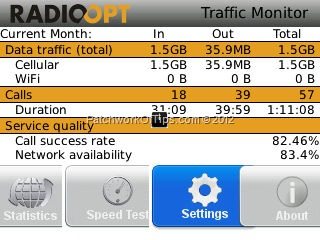
Simply run a quick search for Traffic Monitor For BlackBerry application via BlackBerry Appworld then install and configure as shown in the images below.
The application allows you to check your data usage over days, weeks and months as well as running a speed test to determine how fast your network is.
Simply go to Settings and tick Enable Cellular Traffic Limit. Set Limit to the monthly data allowance allowed by your mobile network then set Warn at to whatever percentage of data usage you’d like.
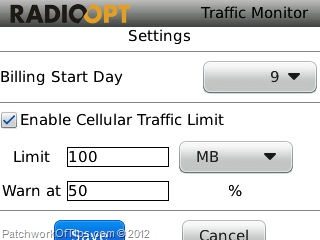
Here’s what the above configuration does.
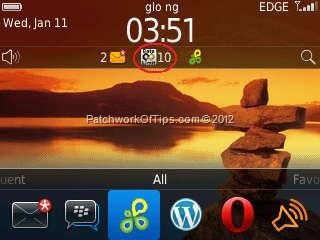
When your data consumption hits 50% of 100MB which is supposed to be your data allowance for the month, the application would immediately warn you on the home screen of your device by showing an icon such as that which appears circled in red in the first image at the top of this article.
Do please note that for some reason, the Traffic Monitor For BlackBerry isn’t compatible with all devices as is the case with some BlackBerry apps. I’m currently using it on a BlackBerry Curve 3G with OS 6.
Hope this helps someone out there 
You’ll also like:
- Glo BlackBerry Social and Complete Internet Plan For N1,400
- BlackBerry OS 10.3.0.1052 Installation & Screenshots
- Etisalat Nigeria BlackBerry Complete, Voice & Social Plans
- Airtel Nigeria Now Offers The Cheapest and Most Cost Effective Mobile Data Plan
- BlackBerry 10 Data Plans For MTN, Glo, Etisalat & Airtel Nigeria
Please share this article to help others. Thanks