UPDATE Oct 23, 2013: There has been changes to the BBM application and the method below only works for getting the PIN of your contacts. If you want to get your PIN, click here
Some of you might have downloaded and installed BBM For Android and can’t seem to find your PIN anywhere across the app. Fret not. It’s pretty easy to locate.
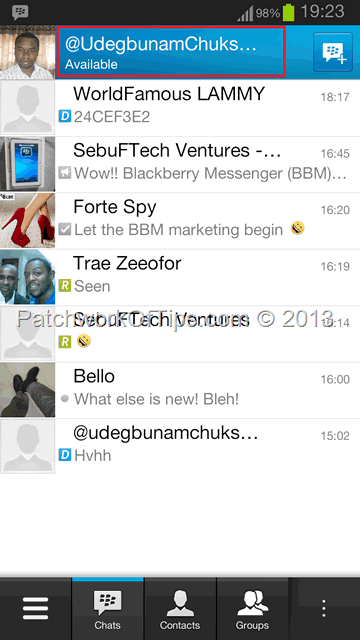
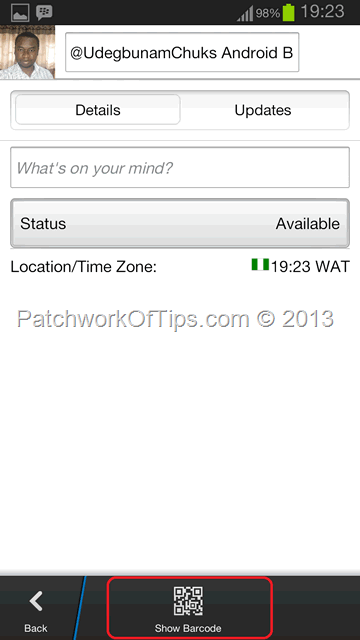
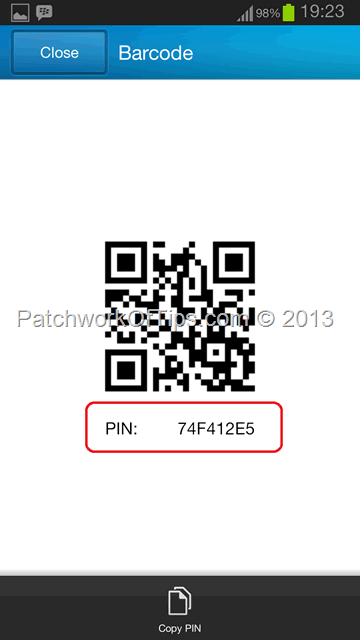
Simply open the app, tap on your name as circled in red, scroll down the next page and tap on Show Barcode to reveal your bar code and PIN
#ThatsAll. Be sure to share the tip 
You’ll also like:
- How To Create BBM PIN and Channels Links - Join Patchwork Of Tips BBM Channel
- How To Start A Chat With Me Via BBM Channels
- How To Delete - Uninstall BBM Channels For BlackBerry 10
- How To Fix Chat Discussion Removed On BBM Groups
- BlackBerry 10.2 Leaked: Download Links and New Features Within
Please share this article to help others. Thanks