Within the span of 3 years, my HP Compaq Presario CQ60 which I bought Christmas of 2008 on promo for N90,000 ($570) has cost me close to N35,000 ($221) in repairs such as battery replacement, keyboard replacement due to Yogurt splash etc. Thus when I started getting yet another battery failure alert, I knew it was time to start searching for a new laptop.
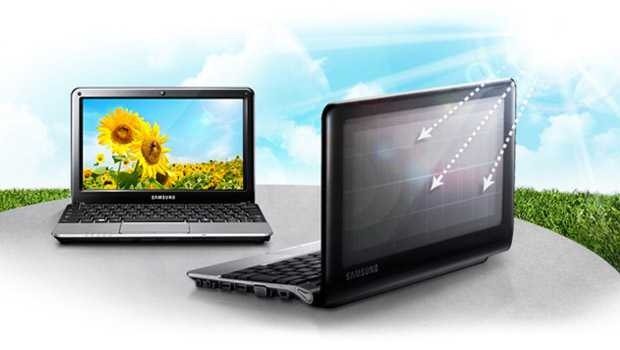
With power supply being epileptic and me needing something ultra portable, I decided to settle for a netbook and the solar powered laptop computer, Samsung NC215-A01US caught my attention immediately ’cause it came with a solar panel which could charge the laptop without electricity supply.
Solar power for computers is something that’s being in the news for quite some time now with Intel recently running tests on a solar powered Pentium CPU which they hope to launch as soon as feasible.
In terms of specifications, the Samsung NC215-A01NG netbook comes with the following
- Intel® ATOM™ Processor N455 (1.66GHz, 667MHz, 512KB)
- 250GB S-ATA Hard Drive (5400RPM)
- 1GB DDR3 System Memory at 1066MHz (Expandable to 2GB Max)
- Embedded Solar Panel on Lid
- Intel GMA3150 (Int. Graphic)
- Anti-glare 10.1″ WSVGA LED Display (1024 x 600)
- 0.3 MP Web Camera
- Bluetooth 3.0 + HS (high speed)
- 3 W Stereo Speaker (1.5 W x 2)
- 10/100 LAN
- Wi-Fi 802.11 bg/n 1×1 (up to 150Mbps)
- Windows® 7 Starter Edition
- Solar Power Calculator (Eco Mode)
- Ports: 3 USB 2.0, VGA, MIC-In, 4-in-1 card reader, RJ45
- Headphone and Microphone output.
- 8,000mAh 6-cell Lithium-Ion Battery, up to 14.5 hours
ADVANTAGES OF SAMSUNG NC215-A01 SOLAR NETBOOK
- Long Battery Life: under normal conditions, it is reported that the battery life of this laptop lasts an amazing 14.5 hours. I personally ran a test 2 days after I purchased it to see how long the battery would last if dedicated to movie playback only and I got over 7 hours of playback with Windows Media Player (with Avira Antivir Personal, Bluetooth and Wi-Fi switched off and using head phones)
- Solar Powered Charging: while working in the sun, you can be rest assured of continuous power as the solar panel offers you 1 hr. of battery life for 2 hrs. of solar exposure. What’s more it even charges while switched off.
- Internet connectivity and fast data transfer made possible via LAN, Wi-Fi, Bluetooth and and an SD slot that supports SD, SDHC, SDXC, MMC cards.
- USB Charging: the USB port on the left side of the netbook can be set to charge your mobile phones and devices while in sleep mode or even switched off. To activate USB charging simply open Samsung Control Center application, go to the System Controller tab under General section then switch USB Charging ON.
- Fast Start: Samsung innovative hybrid of the regular sleep mode allows to to re-commence work on your system in less than 3 seconds.
- The Web Cam may not be of high quality but it still works for video messaging and calls so you can Skype away

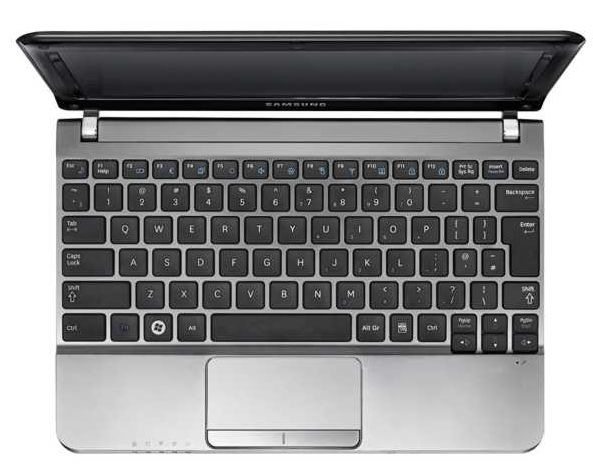
- Island style keyboard in which there’s a lot of space between keys which allows for faster and less error prone typing
- Anti-Glare Super Bright screen: makes working in the brightest of sunlight eye-strain free.
- Battery Life Extender: yet another innovation from Samsung Electronics that charges your battery only to 80% thereby increasing your battery life by increasing the number of charge cycles. This feature like USB Charging can be found under the General section.
- Ultra-Portability: with a sleek design and weighing just 2.87 lbs. (1.3 kg) with 10.20″ x 7.07″ x 0.93~1.41″ dimensions and solar panel charging coupled with 12hr plus battery life, the NC215-A01 is one device that offers the ultimate in portability.
- Proper Cooling System/Ventilation: the battery is shaped in such a way that makes the base of this netbook concave and thus allows for proper ventilation and cooling of the system

DISADVANTAGES OF SAMSUNG NC215-A01 SOLAR NETBOOK
- No Optical Drives: as a power saving measure, most netbooks do not come with CD/DVD drives making the installation of softwares and CD/DVD playback impossible unless you have an external optical drive
- Poor and Slow Multitasking: netbooks are basically designed for document viewing and editing and web browsing with multimedia playback. Carrying out heavier tasks such as gaming slows down the system as the 1GB RAM is just not enough. Reports say upgrading to 2GB RAM makes things faster but that would only increase the cost of the device. In my case, I got a boost in speed by simply deactivating all unnecessary Windows features via Control Panel >> System >> Advanced System Settings >> Performance >> Visual Effects >> Adjust For Best Performance.
- Optimal Solar Charging is only possible in direct sunlight from mid day. Solar charging through a window will be slow.
- Lack of internal 3G HSDPA SIM slot: having a SIM slot for mobile broadband would have been awesome but I think I can live with its absence in this netbook as it might have even taken the price tag higher.
It’s highly recommended that you charge the netbook fully before turning it on for the first time as the setup process takes close to 30 minutes. When fully charged the battery indicator changes from orange to yellow.
I personally recommend you partition the hard drive so that you can host all your documents on the second partition in the event that the Samsung Netbook crashes and you need to restore it without losing your data. I highly recommend EASEUS Partition Master Home Edition.
The netbook also comes equipped with Samsung Recovery Solution 5 which allows you to backup your netbook, restore your netbook to a previous state or to factory settings and also allows you to reinstall selected softwares that shipped with the computer in the event that they get corrupted.
Most of the features such as USB charging, Battery Life Extender etc can be found within the Samsung Control Center.
NOTE:Samsung Electronics does have a variety of netbooks with the same features as the Samsung NC215-A01 that also boast of over 10 hrs. of battery life such as the Samsung NC110-A03US 10.1-Inch Netbook and it costs less.
The Samsung NC215-A01 is best suited for folks that work in the outdoors during long periods so do please choose wisely.
Feel free to check out Amazon Best Sellers: Best Netbook Computers and leave a comment/question below regarding this awesome solar panel powered netbook from Samsung.
You’ll also like:
- How To Make Your Netbook Run Faster On 1GB RAM
- Samsung NC 215-A01 Solar Powered Laptop Now Available In Nigeria
- How To Fix BlackBerry Desktop Software Installation Files Cannot Be Validated
- Vantium Power Capsule Review: Mini Inverter - Charger For Mobile Gadgets
- Quick Tip: How To Fix Windows Media Player 12 Library Not Updating
Please share this article to help others. Thanks