With the advent of Facebook’s vanity urls, it’s now a little bit difficult to find out your facebook profile’s id number. This ID number is unique for each and every account on facebook.
Facebook Plugins such as Facebook Comment Control and Facebook Comments For WordPress require your Facebook UID or User ID number to be able to poll comments, send notifications etc.
Here’s how to get yours without a fuss.
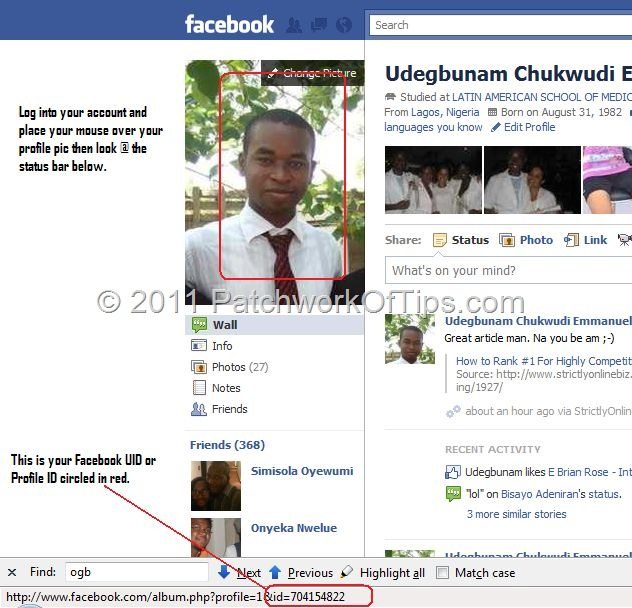
Log into your facebook account and to your profile page.
Just as shown in the image below, place your mouse over your profile pic and then look @ the status bar of your browser to get your facebook profile id or user id.
That’s all there is to it. Enjoy and share with your friends on Twitter, Facebook etc  .
.
You’ll also like:
- Take Note: Your BBM For Android PIN Is Attached To Only One Device
- How To Setup Email Accounts On Samsung GT C3212
- How To Fix BlackBerry Error ID 40730
- How I Fixed Failed: Crawl Anomaly On Google Search Console
- How To Install Official Google Play Store On BlackBerry 10
Please share this article to help others. Thanks