How To Unlock Huawei USB Internet Modem Without Unlock Code


Unlock MTN Nigeria's FastLink Modem

Unlocking your USB Internet Modems is a great way of making sure that wherever you go, you are able to surf the internet on just about any network. Unfortunately some usb internet modems which are locked to the network provider might prove a bit difficult to unlock and MTN Nigeria’s FastLink Huawei modem is one of such modems.

For some reason, some MTN FastLink usb modems just don’t pop-up a window asking for an unlock code and that has baffled a lot of folks including me. Well one of the visitors here seems to have found a way to unlock his own Fastlink modem and has been gracious enough to share how he did it with me.

Here are the steps to unlocking your MTN Nigeria FastLink Huawei modem without any unlock code.

NOTE: This is just a tutorial based on a phone chat I had with my visitor. I don’t guarantee that this will work but since it worked for him, I’m guessing it should work for every other person.


STEP 1

Insert the SIM card you’d like to browse with inside your MTN FastLink Modem and then plug it into your computer/laptop.

STEP 2

Launch the MTN FastLink Connection Manager, go to Tools and then Network as shown in the image below. Under Network Type, select 3G preferred and Band GSM900/GSM1800/WCDMA2100. Click Apply
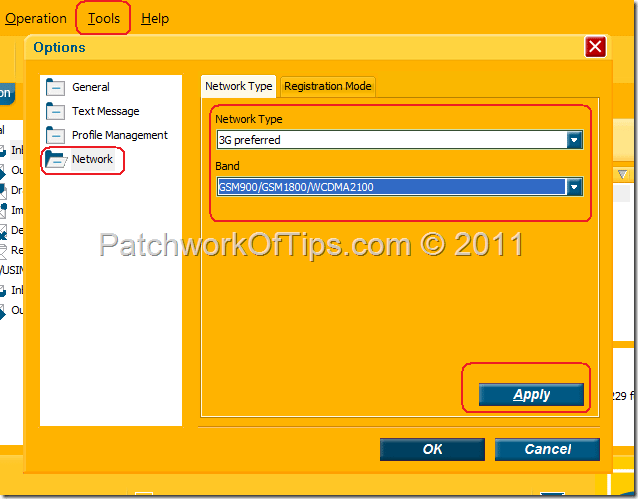
Unlock Huawei Modem Without Code


STEP 3

Go the Registration Mode tab and select Manual search and register. Click on Refresh and wait a minute after which the list of all networks within the reach of the modem will be displayed. Select the network you’d like to connect to and click Register.

NOTE: If you have an Etisalat SIM card in the modem, you choose Etisalat or 62160 (2G) as shown below.
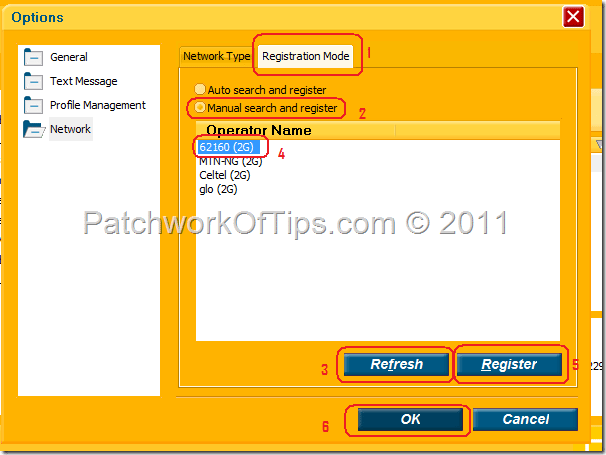
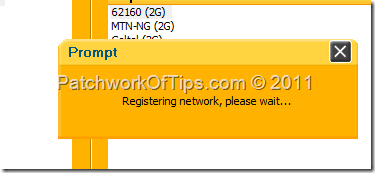
Change Network Settings For Huawei Modem


Register Huawei Modem To Preferred Network


Wait for the modem to Register to your selected network and then click OK to exit the options area.


Step 4

The network of your choice should now be showing at the bottom left corner of the connection software. Simply select the Connection profile for your network and click Connect and you’re good to go Winking smile

Connect To Internet With Unlocked Huawei MTN FastLink Modem

If you don’t know how to create connection profiles, please click here and scroll down a little.

Do please be kind enough to leave a comment and let me know if this works for you or not. Thanks a lot and thanks to the guy whose feedback made this post possible.

Have a great weekend Winking smile.


Author Photo

Article written by On

I’m a Medical Doctor wannabe geek/celeb with an addiction to all things Lights, Camera, Action! I own a BlackBerry Z10, a THL W6, a BlackBerry PlayBook 64GB Wi-Fi , a Dell Inspiron N411Z and the Pliris Blaze +. You can connect with me via Twitter, Facebook, Google+ and BlackBerry Messenger 24CEF3E2 for updates and support


32 Comments so far. Leave Yours Below

If you want to ask a question regarding anything, do please make use of the floating search bar at the top of this site. If you don't find what you're looking for, then feel free to ask your question

Most comments will get a reply within 1hr to 24hrs


Comment moderation is enabled and may delay your comment. There is no need to resubmit your comment.


  1. trae_z says:

    nice one; hopefully will be useful someday as MTN right about now satisfies me just fine. keep up the good work; cheers!

  2. Butch Sapitan says:

    I have Huawei e1552, and entering unlocked codes have reach the limit of 10 tries, is there anyway I can ulocked this modem. Pls help. Thanks

    • Oyedepo John says:

      You can use the PUK Code to unlock it. Go to www.az-gsm.com and generate your Unlocking Code. Then use the 2nd code from the one generated to first unlock the modem, then use the Unlocking Code to unlock it to different networks. Hope it helps?

  3. don says:

    TIPS TO UNLOCK YOUR MTN F@STLINK

  4. victor says:

    i need to crack my hawai moderm to brouse free.

  5. victor says:

    those using zain modem can try this simple trick. insert your card of choice while your modem is still unplug. after inserting your card now plug in your modem to your system and launch you modem. it will automatically launch your new card. now click connection and tell others your expirience

  6. maxwell says:

    i have tried several times and ways to unlock my vodafone mobile connect huawei modem model K3565-Rev with IMEI 359574030983465. pls help me unlock it. thanks

  7. maxwell says:

    i want u to help me unlock my Vodafone mobile connect huawei model K3565-Rev with IMEI 359574030983465. i have tried several ways to unlock it.

  8. Kayode says:

    After generate the code.i put another sim network but the pop window those not display to put my generating code.am using glo 3g

  9. Icytreyrichards says:

    huawei model E160E SERIAL NUMBER DY5TAA19B2207440

    • Udegbunam Chukwudi says:

      Please make use of the instructions above. I can’t unlock the modem for you. Also you need imei number not serial number

  10. Jessej2shine says:

    wahoo… its funs all tru

  11. mwadini says:

    i want to unlock my mordem please help for me couse i want to use 3 line in one

  12. OBED OFORI says:

    I want to unlock my MTN F@st E173 HSPA Modem with IMEI:860604004873954,please can you help?

  13. salito says:

    Hi sir, please i need all the unlocking trick for huawei and zte modems

  14. GOPI says:

    I have Huawei EC 152 and entering unlocked codes

  15. sheu adewale says:

    Please me to unlock my mf190 zte usb modem….
    IMEI: 861648008241873
    SERIAL: NO 325711815437
    EAN: 6934933007512
    THANKS…..

  16. Onu Elijah Ashu says:

    i want a soft for HWAWEI modem unlocker please

  17. serious serious says:

    my GLO usb modem is not having an [nlock code. how can i remove de lock on it pls

    • Chukwudi Emmanuel Udegbunam says:

      @Serious: What’s the model of your modem and the IMEI number?

      • Danye Kebede says:

        hi, would you please help me unlock my Zain E1690. The apparatus says zain sudan when i insert it into my pc and ask me to add the data card number which Ethiopian CIM cards lack. what should i do to unlock the apparatus so as to make it recognize my(ethiopian) CIM card? the model no(E1690)also doesn’t exist on your list of the unlock codes. So would you please find me one for this model, if there is any? Eagerly waiting for ur response…

        • Chukwudi Emmanuel Udegbunam says:

          @Danye: you could try generating a generic code using the software’s Huawei settings then trying the unlock code it gives you once to see it that will work. If it fails once, do please search this site for *DC Crap* and use that software to unlock it

  18. dilun says:

    its cool just followin up things here, 4 d 1st time

  19. agams jo says:

    i want to unlock my etisalat modem, please help me, my modem information is:

    ZTE MF631
    imei 861424013682240